Prompt Finder: The Complete Guide to Finding the Best AI Prompts Fast
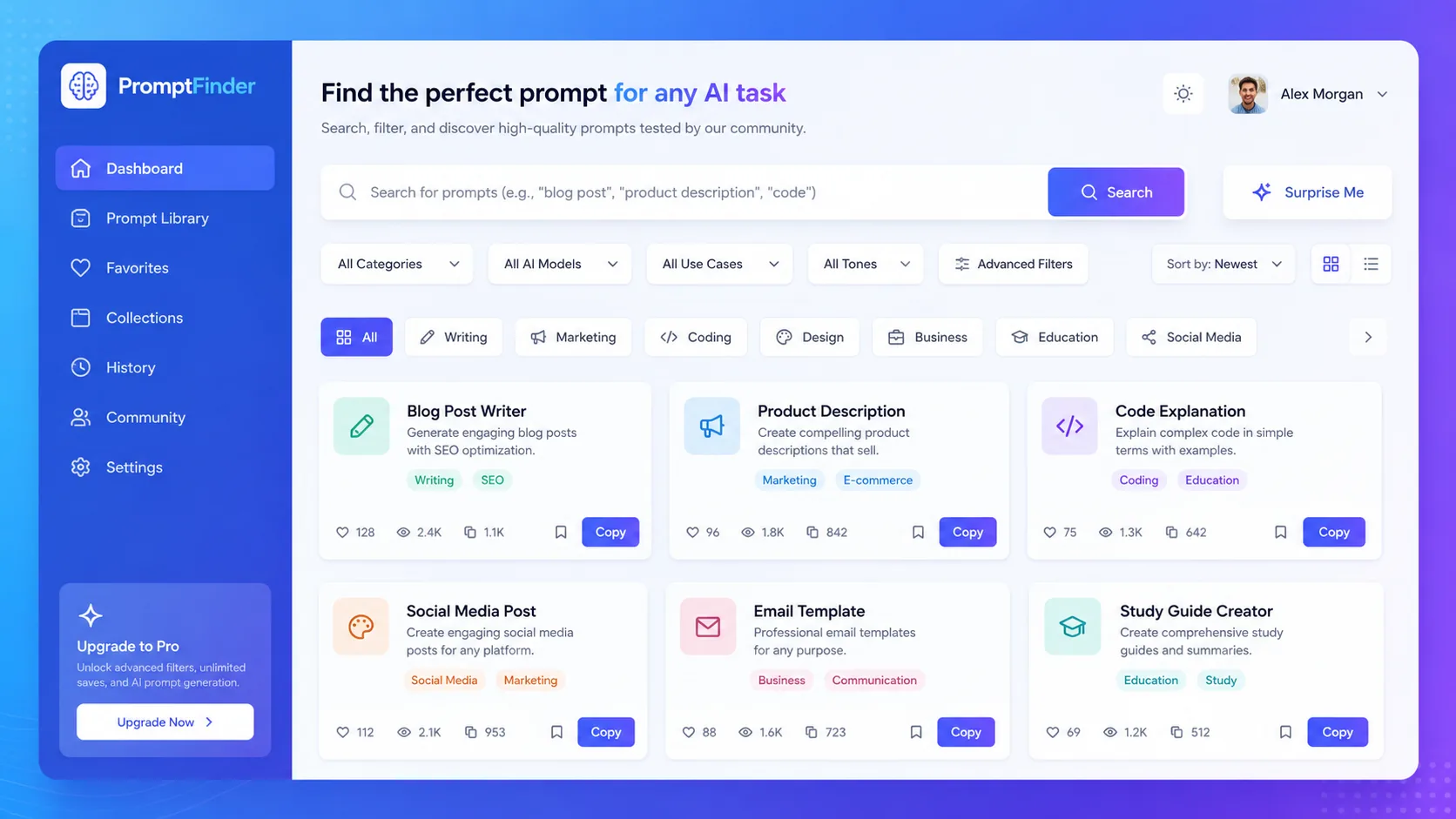
If you've spent twenty minutes typing and retyping a prompt into ChatGPT trying to get a decent result, you already know the real bottleneck in AI work isn't the model — it's the prompt. That's exactly the problem a Prompt Finder solves. Instead of guessing, you search a library of tested prompts, pick one that fits your task, tweak it, and get a better output in seconds.
Quick answer: A Prompt Finder is a search tool that lets you discover, filter, and reuse pre-written AI prompts for tools like ChatGPT, Claude, Gemini, and Midjourney — instead of writing every prompt from scratch.
Table of Contents
What Is a Prompt Finder?
A Prompt Finder is a searchable directory or tool that helps you locate ready-made, tested prompts for AI models based on category, use case, or keyword — rather than writing a prompt from a blank page every time. Think of it like a search engine, but for prompts instead of web pages: you type what you want to accomplish, and it surfaces prompts that already work for that task.
Unlike a prompt generator, which creates a new prompt for you based on your input, a Prompt Finder helps you discover prompts that other people (or a curated database) have already written and refined.
Why Prompt Finder Matters
Writing a genuinely effective prompt takes more skill than most people expect. A vague prompt gets a vague answer; a well-structured one gets a usable result on the first try. That gap is exactly why prompt libraries and search tools have become popular.
- Saves time — no more rewriting the same type of prompt over and over.
- Improves output quality — tested prompts tend to produce more consistent results.
- Lowers the learning curve — beginners get access to prompt structures they wouldn't know to write themselves.
- Builds consistency — teams can standardize how they prompt AI tools across a project.
How a Prompt Finder Works
Direct answer: A Prompt Finder works by indexing a library of prompts tagged by category, model, and use case, then letting you search or filter that library to find a prompt matching your task.
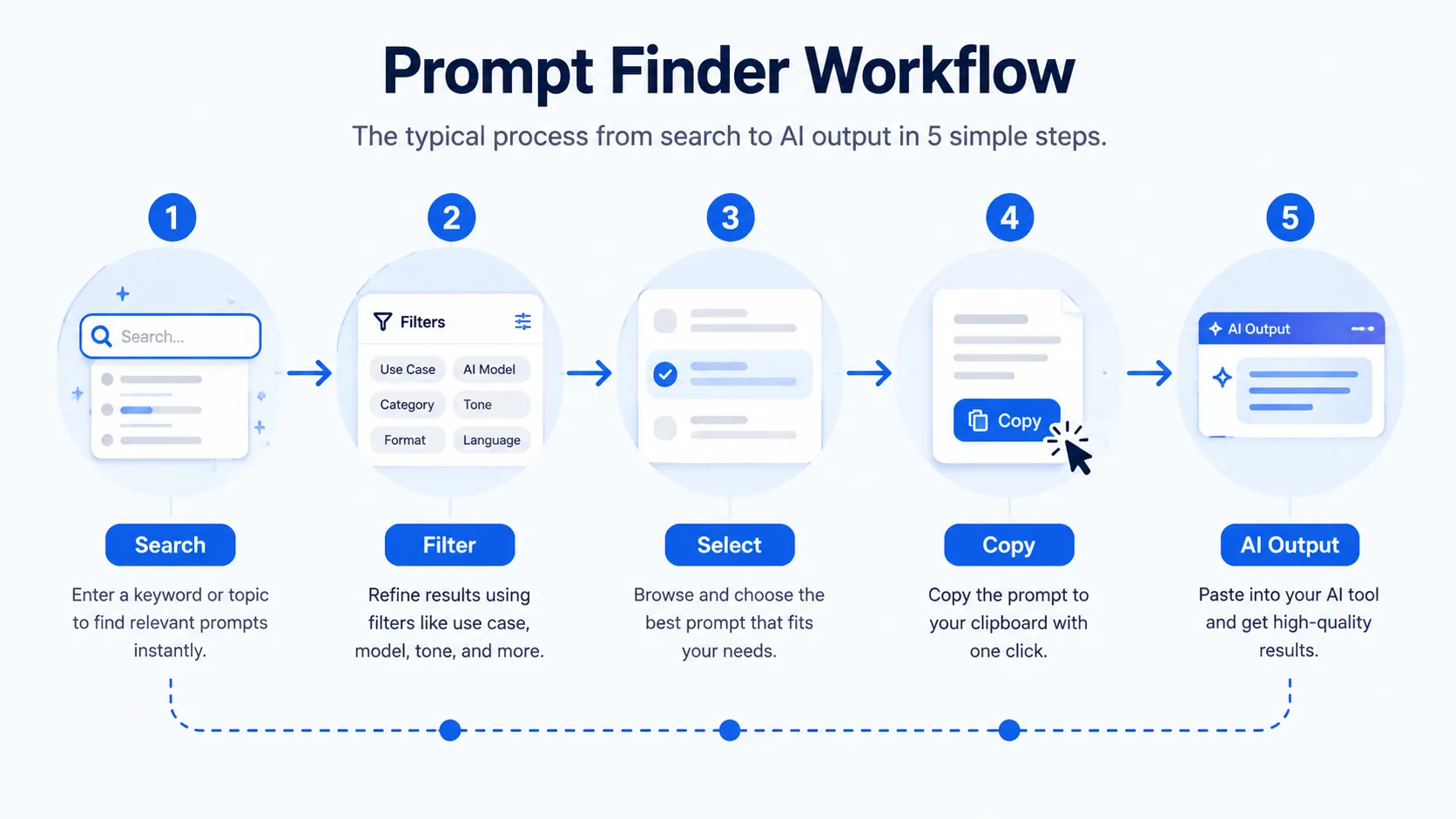
- Prompt Database — a collection of prompts tagged by AI model and category.
- Search & Filter Layer — lets you search by keyword or filter by category, model, tone, or output type.
- Prompt Cards — each result shows the prompt text, a short description, and sometimes an example output.
- Copy/Use Action — a one-click way to copy the prompt and paste it directly into your AI tool.
Core Features
| Feature | What It Does |
|---|---|
| Keyword Search | Find prompts by typing what you want to accomplish |
| Category Filters | Narrow results by use case (writing, coding, design, marketing) |
| Model Tags | See which prompts work best for ChatGPT, Claude, Gemini, or Midjourney |
| Prompt Preview | View the full prompt text before using it |
| Copy-to-Clipboard | Instantly copy a prompt without retyping |
| Favorites/Save | Bookmark prompts you use often |
Who Should Use a Prompt Finder?
- Bloggers — quickly find prompts for outlines, headlines, and content ideas.
- SEO professionals — locate prompts for meta descriptions and content briefs.
- Developers — find coding-specific prompts for debugging or documentation.
- Students — get study aid prompts for summarizing or quiz generation.
- Digital marketers — access prompts for ad copy and social captions.
Prompt Finder vs Prompt Generator vs Prompt Library
Direct answer: A Prompt Finder helps you search existing prompts, a Prompt Generator creates a new prompt based on your input, and a Prompt Library is the static collection a Prompt Finder searches through.
| Tool Type | What It Does | Best For |
|---|---|---|
| Prompt Finder | Searches and filters existing prompts | Finding a proven prompt quickly |
| Prompt Generator | Builds a custom prompt from your description | Creating something tailored from scratch |
| Prompt Library | A static, browsable collection | Browsing by category without search |
✨ Build or Refine Your Own Prompts
Don't just find prompts — generate and enhance your own with our free AI tools.
AI Prompt Generator → AI Prompt Enhancer →Step-by-Step Prompt Finder Workflow
- Define your goal. Know what output you want — a blog outline, code fix, or email draft.
- Search by keyword or category. Type a relevant term or filter by use case and AI model.
- Review prompt cards. Read the prompt text before choosing.
- Copy the prompt. Use the one-click copy feature.
- Customize it. Adjust details — your topic, tone, or constraints.
- Run it in your AI tool. Paste into ChatGPT, Claude, Gemini, or your tool of choice.
- Refine if needed. Tweak wording based on the first output.
Best Prompt Finder Tools
Direct answer: The best Prompt Finder tools combine a large, well-tagged prompt database with fast search and filtering, without requiring payment for basic use.
| Tool Type | Examples | Notes |
|---|---|---|
| Free/Community Platforms | FlowGPT, PromptHero | Large community-submitted libraries, mixed quality |
| Browser-Based Utilities | Free online prompt finder tools | No signup, instant search |
| Premium Platforms | Paid prompt marketplaces | Curated, higher-quality prompts |
Prompt Engineering Tips
- Be specific about format. Ask for a table, bullet list, or word count explicitly.
- Give context, not just instructions. Specificity beats vague requests every time.
- Specify the tone. Formal, casual, persuasive, or technical — say it directly.
- Iterate, don't restart. Refine the same prompt instead of starting over.
Common Mistakes to Avoid
- Using a prompt as-is without customizing details — generic inputs produce generic outputs.
- Ignoring the target AI model — a prompt tuned for Midjourney won't work the same way in ChatGPT.
- Overcomplicating the prompt — stacking too many instructions confuses rather than helps.
- Not specifying output format — leads to inconsistent structure.
The Future of Prompt Finder Tools
As AI models become more capable, prompt discovery tools are shifting from simple keyword search toward smarter matching — surfacing prompts based on intent rather than exact wording. Expect deeper integration with AI writing assistants and growing emphasis on quality curation over sheer volume.
Frequently Asked Questions
What is a Prompt Finder?
A Prompt Finder is a search tool that helps you discover pre-written, tested AI prompts by keyword, category, or AI model, instead of writing every prompt from scratch.
How does a Prompt Finder work?
It searches a tagged database of prompts and lets you filter by category, model, or keyword, then provides a one-click way to copy the prompt for use.
Is a Prompt Finder different from a Prompt Generator?
Yes — a Prompt Finder helps you find existing prompts, while a Prompt Generator creates a new custom prompt based on your specific input.
Are Prompt Finder tools free?
Many are free, especially community-driven and browser-based tools; some premium platforms offer curated libraries for a subscription fee.
Can I use Prompt Finder for ChatGPT specifically?
Yes — most Prompt Finder tools tag prompts by AI model, including ChatGPT, so you can filter for prompts optimized for that platform.
Conclusion
A Prompt Finder won't do your thinking for you — but it will save you the repetitive, frustrating part of AI work: staring at a blank prompt box wondering how to phrase what you want. Try it yourself the next time you open an AI tool, and check out our AI Prompt Generator and AI Prompt Enhancer to build and refine your own prompts too.